AI in B2B marketing has moved past the "write me a blog intro" phase.
In 2024 and 2025, most teams experimented with AI for content, research, summaries, email copy, and campaign ideas. In 2026, the real advantage is not using AI as a writing assistant. It is using AI as workflow infrastructure.
It connects your CRM, enrichment tools, intent data, outbound platform, LinkedIn automation, ad audiences, webinar data, website activity, Slack alerts, reporting dashboards, and human approval layers. It turns repetitive marketing work into a repeatable system with triggers, rules, context, and handoffs.
At Omnitics, we look at AI the same way we look at revenue operations: if it depends on someone remembering to do it manually, it is not finished yet.
But before a team jumps into n8n, Make, Zapier, APIs, or CRM automation, they need to do one thing first. They need to design the workflow.
- In 2026, AI's real edge is as workflow infrastructure, not a writing assistant.
- Design the flow on a visual canvas (Miro, Whimsical) before you build it in n8n.
- Five workflows matter most: account research, intent-to-play, multichannel outbound, content repurposing, and pipeline intelligence.
- Keep a human in the loop wherever reputation is at risk.
- Use structured inputs and outputs (a score, a reason, a recommended action), never "write something useful."
Before You Automate, Visualize the Workflow
The fastest way to create messy automation is to start building before the logic is clear. That is why every AI workflow should begin on a visual canvas.
Tools like Miro, Whimsical, FigJam, and Lucidchart help marketing, sales, RevOps, and leadership teams brainstorm the workflow before it becomes a live automation. Miro's AI diagramming can turn text descriptions into editable flowcharts, while Whimsical can generate flowcharts from simple prompts.
This planning layer matters because AI workflows are not just technical. They are business logic. Before creating an automation in n8n, the team should map:
- What triggers the workflow?
- What data is needed?
- Which tools are involved?
- Where does AI summarize, classify, score, or recommend?
- Where should a human approve the output?
- What happens if the workflow fails?
- What is the final business action?
For example, before building an account-research automation, the raw flow could be mapped like this:
New account added to CRM, enrich company data, check ICP fit, ask Claude to summarize business context, score the account, push the summary to Salesforce, alert the SDR in Slack, then add the account to an outbound or LinkedIn sequence.
That visual map then becomes the blueprint for n8n. n8n works well as the automation layer because it combines visual workflow building, AI capabilities, app and API connectivity, and the flexibility to build more technical automations when needed.
The smartest B2B marketers in 2026 will not just be prompt writers. They will be workflow architects.
The Practical n8n Architecture Behind These Workflows
Think of n8n as the central nervous system.
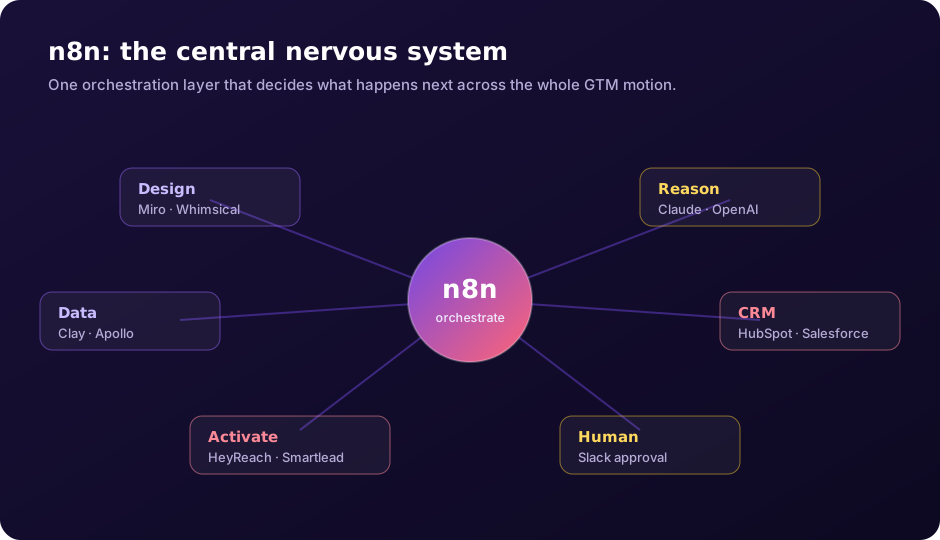
Miro or Whimsical is where the team designs the workflow. n8n is where it runs. Claude, OpenAI, or Gemini adds reasoning. Clay, Apollo, ZoomInfo, or BuiltWith provide data. HubSpot or Salesforce store the system of record. HeyReach, Dripify, Smartlead, Instantly, and LinkedIn Ads activate the play. Slack keeps humans in the loop.
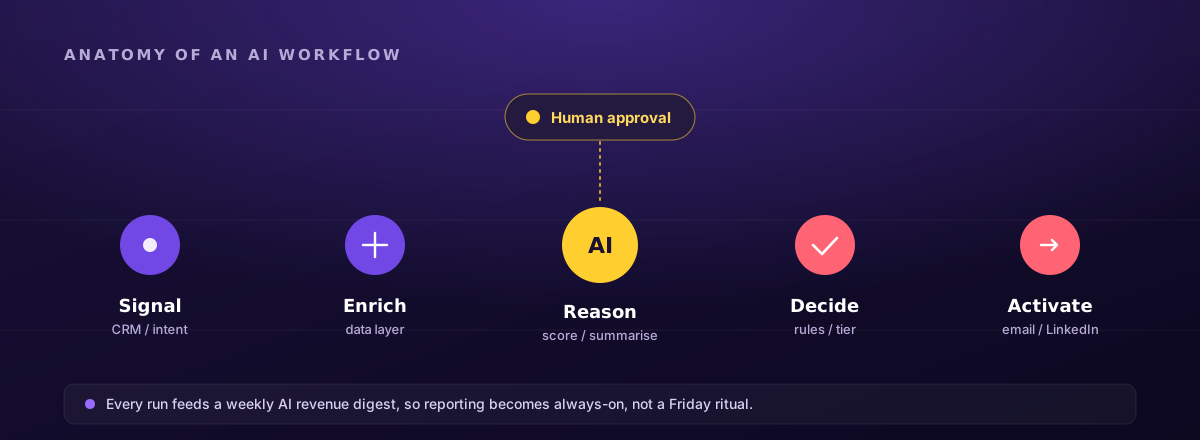
A simple n8n-powered GTM workflow has eight layers:
- Trigger: a new account enters the CRM or an intent signal appears.
- Data: enrich the account using Clay, Apollo, BuiltWith, or internal CRM fields.
- AI: Claude or OpenAI summarizes account fit and recommends a play.
- Decision: n8n checks score, segment, geography, persona, and campaign eligibility.
- Activation: add the contact to Smartlead, Instantly, HeyReach, Dripify, or a LinkedIn Ads audience.
- Human: send a Slack alert for approval or manual SDR action.
- CRM: update lifecycle stage, notes, campaign membership, and the next task.
- Reporting: push activity and outcomes into a weekly AI revenue digest.
This is where AI becomes useful. Not as a disconnected chat window, but as a decision and execution layer inside the GTM system.
Here are the five AI workflows every B2B marketer should know.
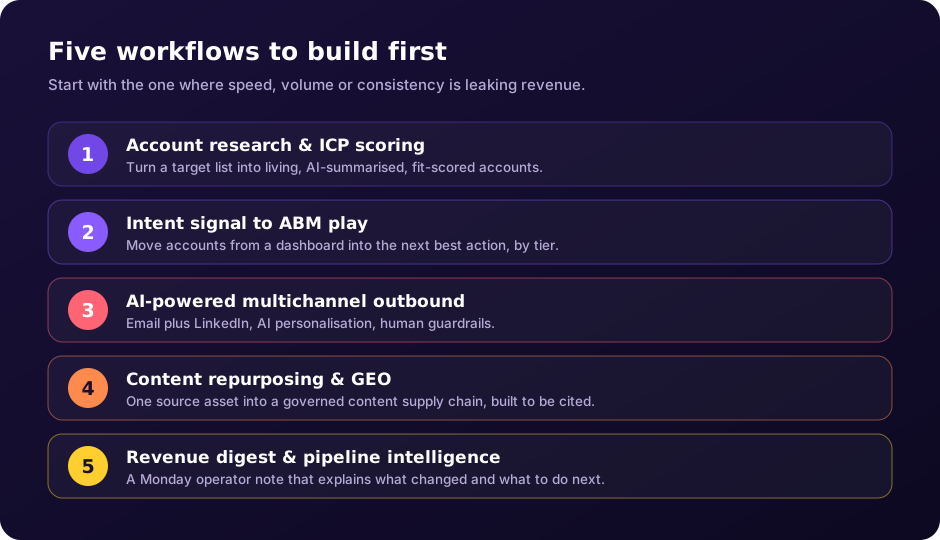
1. AI Account Research and ICP Scoring Workflow
Many ABM programs stall before the first campaign launches because the account list is weak. Teams either pick accounts on firmographics alone or lean too heavily on sales intuition. AI can make this sharper.
The workflow starts when a new target account enters your CRM or spreadsheet. n8n pulls the company domain, LinkedIn URL, industry, employee count, hiring signals, technology stack, recent news, website messaging, and CRM history. Claude, OpenAI, or Gemini then summarizes the account in plain English.
The output should include:
- Company summary
- ICP fit score
- Buying-committee hypothesis
- Likely pain points
- Relevant trigger events
- Suggested first-touch angle
- Confidence score
For example, the AI may say:
High-fit account. The company sells to enterprise buyers, has recently hired RevOps leadership, uses Salesforce, and is expanding its customer-success function. Recommended angle: connect customer-feedback visibility to expansion and retention.
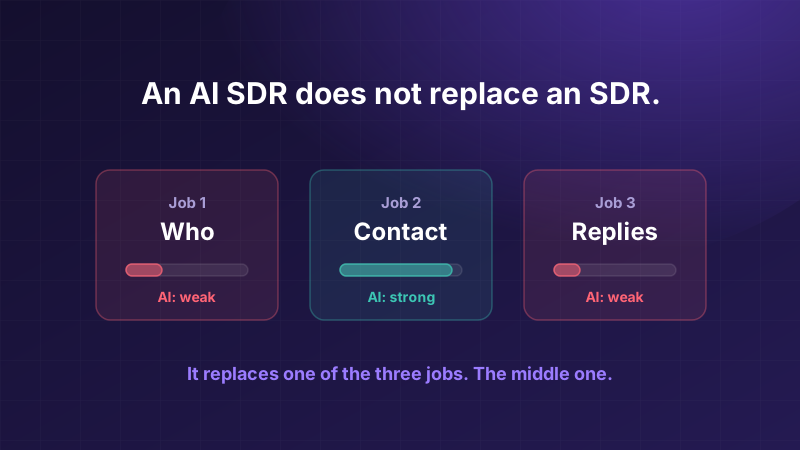
The AI should not make the final decision alone. It should provide structured reasoning that a marketer or SDR can review. That split, the machine drafting and a human judging, is also the line where AI SDR tools stop being able to replace a rep.
Suggested stack: Miro or Whimsical for planning, n8n for automation, Claude or OpenAI for account summarization, Clay for enrichment, Apollo or ZoomInfo for contacts, BuiltWith for tech stack, HubSpot or Salesforce for CRM, Slack for alerts.
A Clay-style flow looks like this:
Target account added, company enriched, contact data found, intent or trigger identified, AI creates an account summary, fit score assigned, CRM updated, SDR alerted.
The lesson is simple: account research should not be a one-time spreadsheet exercise. It should become a living workflow that continuously improves account quality.
2. Intent Signal to ABM Play Workflow
Intent data is only useful if something happens after the signal, which is the whole argument for signal-based selling. A target account visits your pricing page. A dream account shows category intent. A VP of Customer Experience joins a bank. A competitor-comparison page gets traffic from an enterprise account. These moments should trigger action.
In this workflow, website-identification tools and intent platforms push account activity into n8n. The workflow checks whether the company is already in your CRM, enriches missing fields, identifies the right segment, and triggers the next best play.
For a Tier 1 account, that could mean:
- A Slack alert to the AE
- An AI-generated account brief
- A personalized landing-page request
- A manual SDR task
- A LinkedIn ad-audience update
- A LinkedIn connection request through HeyReach or Dripify
For a Tier 2 account, it could trigger:
- A three-email nurture sequence
- A LinkedIn retargeting audience
- A relevant webinar invite
- A CRM engagement-score update
- A LinkedIn touchpoint after email engagement
For a broader ICP account, it may simply increase the engagement score and keep the company in a nurture path.
Suggested stack: Miro or Whimsical for the trigger map, n8n for orchestration, Factors.ai, RB2B, Leadfeeder, Demandbase or 6sense for account intent, Clay for enrichment, HubSpot or Salesforce for CRM, LinkedIn Ads for retargeting, HeyReach or Dripify for LinkedIn outreach, Smartlead or Instantly for email, Slack for alerts.
The lesson: intent should not live in a dashboard. It should move accounts into action.
3. AI-Powered Multichannel Outbound Workflow
B2B outreach in 2026 is no longer only about cold email. Buyers move across email, LinkedIn, webinars, communities, search, review sites, and dark social. If your workflow only sends emails, you are leaving context behind. The better approach is multichannel sequencing with AI-assisted personalization and human guardrails.
The workflow begins with a prospect list from Clay, Apollo, ZoomInfo, LinkedIn Sales Navigator, or your CRM. n8n enriches the contact and company, checks whether the prospect is eligible for outreach, and sends selected fields to Claude or OpenAI. The AI should not write the entire message blindly. It should generate a short, business-relevant personalization snippet that works across email or LinkedIn.
Then n8n routes the contact into the right channel:
- An email-first sequence in Smartlead or Instantly
- A LinkedIn-first sequence in HeyReach or Dripify
- A hybrid email-plus-LinkedIn sequence
- A manual SDR review for strategic accounts
- No outreach at all if the account is not a fit
HeyReach is especially relevant for teams that want LinkedIn automation connected to a broader GTM system, with API and webhook capabilities, HubSpot CRM sync, and connections into Clay, n8n, Make, and Zapier. Dripify is also useful for LinkedIn automation, with integrations through Zapier and Make that sync CRM data and push lead fields into Salesforce or HubSpot.
LinkedIn automation should be used carefully. The goal is not to spam more people, it is to make relevant, well-researched outreach easier to manage. Keep volumes controlled, use working-hour limits, avoid misleading personalization, respect opt-outs, and route high-value replies to humans quickly.
Suggested stack: Whimsical for sequence logic, n8n for orchestration, Claude or OpenAI for personalization and reply classification, Clay and Apollo for enrichment, HeyReach or Dripify for LinkedIn automation, Smartlead or Instantly for email, HubSpot or Salesforce for CRM sync, Slack for human approval.
The lesson: LinkedIn automation should not be an isolated campaign. It should be part of a governed GTM workflow connected to CRM, enrichment, AI, email, and SDR follow-up.
4. AI Content Repurposing and GEO Workflow
B2B teams already have more raw material than they realize: webinars, sales calls, product demos, customer interviews, podcasts, analyst briefings, internal POVs, case studies, founder notes. Most of it dies after one use. This workflow turns one high-quality source asset into a content engine.
Upload a webinar transcript, call recording, or expert interview. AI summarizes the core arguments, extracts original insights, identifies audience pain points, and creates derivative assets:
- Blog outline
- LinkedIn post
- Email nurture
- Sales one-pager
- FAQ section
- Short video captions
- Webinar follow-up email
- Comparison-page snippets
- AI-search optimized answers
The key is to build for both humans and answer engines, and the format rules for the second audience are specific enough to write down: see the answer block spec. In 2026, buyers are not only searching Google. They are asking ChatGPT, Claude, Gemini, Perplexity, and Microsoft Copilot for vendor recommendations, category education, and "best tool for X" answers. That means your content needs to be structured, specific, quotable, and useful. It does not mean adding every AI-era file someone proposes: we checked what actually fetches llms.txt, and the answer is mostly SEO audit tools.
Suggested stack: Miro for the content map, Whimsical for the repurposing flow, Fireflies or Fathom for transcripts, Claude or OpenAI for synthesis, Descript for video editing, SurferSEO or Clearscope for SEO support, Ahrefs or Semrush for keyword research, WordPress or HubSpot CMS for publishing, n8n for routing tasks.
The lesson is not to create more random content. It is to build a governed content supply chain where AI moves ideas from brief to campaign faster, without losing brand control.
5. AI Revenue Digest and Pipeline Intelligence Workflow
Most marketing reports explain what happened too late. By the time someone builds the spreadsheet, cleans the data, exports campaign numbers, checks CRM stages, and writes commentary, the week is already over. AI can turn reporting from a manual ritual into an always-on intelligence layer.
This workflow pulls data from HubSpot or Salesforce, ad platforms, outbound tools, LinkedIn automation tools, webinar platforms, website analytics, and spreadsheets. n8n normalizes the data and sends it to an AI model with clear instructions:
- Summarize what changed
- Identify anomalies
- Highlight campaigns needing attention
- List accounts heating up
- Spot funnel leakage
- Identify positive LinkedIn replies
- Recommend next actions
The output should be delivered every Monday morning in Slack or email. Not a dashboard link. A written operator note. For example:
Pipeline created is up 18 percent week over week, mainly from the financial-services webinar follow-up. However, positive replies from the healthcare outbound sequence dropped despite stable deliverability. Three Tier 1 accounts visited pricing and two accepted LinkedIn connection requests. These should be routed to SDR follow-up today.
That is the difference between reporting and operating.
Suggested stack: Miro for reporting architecture, n8n for automation, HubSpot or Salesforce for CRM data, Google Analytics 4, Looker Studio, BigQuery, Google Sheets, Smartlead, Zoom, HeyReach or Dripify, Slack, Claude or OpenAI.
The takeaway: the future report is not a static dashboard. It is a system that reads performance data, explains what changed, and recommends what the revenue team should do next.
Bonus Workflow: CRM-Native AI Assistants
For teams already using HubSpot or Salesforce, the next step is to bring AI closer to the CRM data itself. A CRM-native AI workflow could look like this:
New lead created, CRM checks source and lifecycle stage, AI summarizes company and contact context, lead is scored, next best action recommended, SDR task created, follow-up email or LinkedIn touch drafted, manager sees a weekly summary.
The lesson is that AI becomes more useful when it works inside the system of record. Standalone chat tools are helpful. CRM-native AI workflows are operational.
How to Build These Workflows Without Creating Chaos
The mistake most teams make is trying to automate everything at once. Start with one workflow where speed, volume, or consistency creates a visible revenue leak. In most B2B teams, that is speed-to-lead, account research, CRM hygiene, outbound personalization, LinkedIn follow-up, content repurposing, or campaign reporting.
Then follow five rules:
- Design before you automate. Map the workflow in Miro, Whimsical, FigJam, or Lucidchart before touching n8n.
- Make n8n the orchestration layer, not just another automation tool. Let it decide what happens next based on account tier, intent level, persona, campaign source, reply sentiment, and CRM stage.
- Keep humans in the loop where reputation is at risk: strategic accounts, sensitive replies, public-facing content, and high-value LinkedIn conversations.
- Use structured inputs and outputs. Ask AI for a score, a reason, a summary, a recommended action, a channel, and a confidence level, not "something useful."
- Monitor failures. A broken workflow can quietly damage data, delay follow-ups, duplicate outreach, or send the wrong message. Error alerts are not optional.
The Real Shift in 2026
The AI opportunity for B2B marketers is not about replacing the team. It is about removing the drag.
Your strategists should not be formatting spreadsheets. Your SDRs should not be copying company descriptions into CRM fields. Your content team should not be manually slicing one webinar into ten assets. Your leadership team should not wait until Friday to learn what broke on Monday. Your outbound team should not be managing disconnected email and LinkedIn tools without context.
AI workflows give the revenue team its time back. The winners in 2026 will not be the teams using AI everywhere. They will be the teams using AI in the right places: research, signal detection, multichannel outbound, content repurposing, and pipeline intelligence.
The smartest way to build them is simple:
- Visualize the flow in Miro or Whimsical.
- Automate it in n8n, Make, or Zapier.
- Power it with Claude, OpenAI, Gemini, or another LLM.
- Feed it with clean CRM and enrichment data.
- Activate it through email, LinkedIn, ads, webinars, and SDR workflows.
- Operationalize it inside sales, marketing, content, and reporting systems.
That is where AI stops being a toy and starts becoming infrastructure.
Start with one. Send us a manual process your team repeats, the tools it touches and roughly how often it runs. In a free Workflow Teardown you get a diagram of how we would build it in n8n, with humans in the loop where it matters, build notes and a fixed quote.