Most comparison articles hand you a feature matrix. Feature matrices are close to useless here, because in 2026 all three platforms do roughly the same things: all three now ship serious AI, all three handle branching, all three connect to everything you use.
So here is the comparison that actually changes a decision: what happens to your bill as you grow.
The billing unit: the only thing that really matters
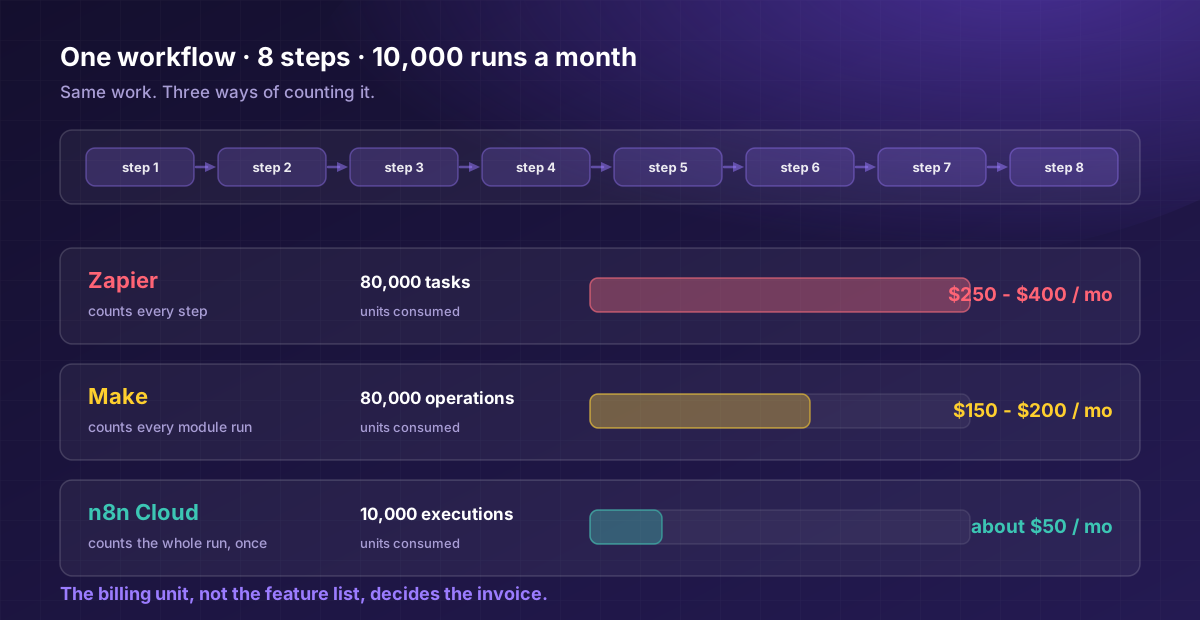
Take one workflow. It has 8 steps. It runs 10,000 times a month. That is a completely ordinary mid-complexity automation: a lead comes in, gets enriched, scored, routed, logged, and announced in Slack.
| Platform | Counts | Units consumed | Roughly costs |
|---|---|---|---|
| Zapier | Each action step = 1 task, triggers are free | 70,000 tasks | $489/mo |
| Make | Each module run = 1 operation | 80,000 operations | set by Make's credit slider |
| n8n Cloud | Each workflow run = 1 execution | 10,000 executions | 50 euros/mo |
| n8n self-hosted | Nothing. It is your server. | Limited by your server | $5 - $20/mo (the VPS) |
Same work. Same result. A spread of several times over, and it widens with every step you add to the workflow. Those are the vendors' list prices on annual billing, checked September 2026.
That is the whole article, really. Everything else is detail.
Why it happens: add a ninth step to that workflow and Zapier charges one more task on every run, and Make one more credit. n8n's bill does not move at all, because it is still one execution. Both Zapier and Make sell units in blocks, though, so their invoices move in steps rather than smoothly. Zapier and Make price complexity. n8n prices frequency. So the question is not "which is cheapest," it is "is my automation wide, or is it busy?"
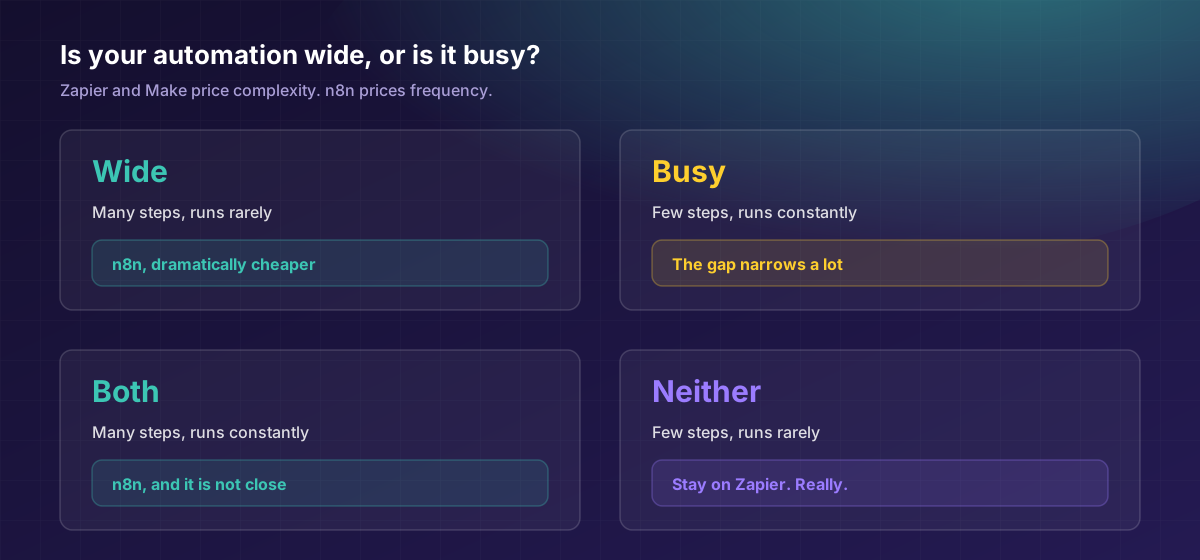
- Wide (many steps, run rarely) means n8n's model is dramatically cheaper
- Busy (few steps, run constantly) means the gap narrows a lot
- Both means n8n, and it is not close
The entry prices, honestly
| Platform | Entry | What you get | Free tier |
|---|---|---|---|
| Zapier | about $19.99/mo (annual, Professional) | 750 tasks | Basic 2-step Zaps |
| Make | about $9/mo | 5,000 credits | Yes |
| n8n Cloud | about 20 euros/mo on annual billing | 2,500 executions, unlimited users | No |
| n8n self-hosted | $0 licence | Unlimited executions | Community Edition |
Prices checked September 2026. All three vendors change plans and allowances often, so re-check the current rates before you commit to anything. n8n publishes in euros, so check the current rate before you compare the columns.
Look at Zapier's entry row again. 750 tasks for $19.99. A three-step Zap (a trigger and two actions) processing 100 records consumes 200 tasks. You can exhaust a month's allowance in an afternoon.
Make gives you 5,000 credits for $9, roughly six times the allowance for under half the price. That comparison alone should be in every honest article about this and almost never is.
And n8n self-hosted: the Community Edition is free software, and what it runs is limited by your server rather than by a plan. You pay for the server, typically $5 to $20 a month on a basic VPS. Note the trade. You are not saving money, you are converting a subscription into a maintenance obligation. Someone has to secure and update that box. If that someone does not exist, the free tier is not free, it is a liability with a countdown.
The crossover: where it flips
The threshold everyone talks about is 10,000 tasks a month, but that is imprecise because it ignores step count. Here is the real geometry:
| Your situation | Cheapest | Notes |
|---|---|---|
| Under about 1,000 tasks/mo, simple workflows | Zapier | Genuinely. The premium is small and the UX is worth it. |
| 1,000 to 5,000 tasks/mo | Zapier or Make | Make is cheaper, Zapier is easier. Pick your constraint. |
| 5,000 to 10,000 tasks/mo | Make | Zapier's bill starts scaling badly here. |
| Over 10,000 tasks/mo | n8n | Make is far cheaper than Zapier at the same volume; self-hosted n8n is cheaper still, before you count maintenance time. |
| Any volume, 8+ steps per run | n8n | The execution model crushes it. |
| AI agents with memory and tools | n8n | Not close. See below. |
| Data residency or compliance | n8n self-hosted | The only one of the three that can be. |
| Nobody technical on the team | Zapier | The cheapest tool you cannot operate costs infinity. |
The most honest sentence in this article: if you run a handful of simple Zaps, stay on Zapier. The migration will cost you more in time than you will save in licence fees, and you will spend it on a platform your team cannot maintain. That is our automation position and we mean it.
The AI question, which is now the real question
All three now ship AI features, and the marketing makes them sound equivalent. They are not.
| Zapier | Make | n8n | |
|---|---|---|---|
| AI in 2026 | Zapier Agents, AI Copilot builds Zaps from natural language | Maia AI assistant, Make AI Agents | n8n 2.0: native LangChain, 70+ AI nodes, vector DB connectors, persistent agent memory, self-hosted LLM support |
| Best for | "Summarise this email, post to Slack" | Mid-complexity AI steps | Real agents: memory across runs, tool calls, RAG |
| AI pricing | Within the task model | Within the credit model | Same execution pricing, no separate AI tier |
That last cell matters more than it looks. If you are building an agent that keeps memory across runs, calls tools, and queries a vector store, n8n is the pick and it is not close, and the AI work does not sit on a separate, more expensive meter.
If you want a simple agent a marketer can manage without help, Zapier's is friendlier. Both statements are true. Pick by who is operating it.
The four costs the pricing pages do not mention
1. The maintenance obligation (self-hosted n8n). Server, updates, security, backups. Realistically 2 to 4 hours a month once stable, and a bad afternoon when it is not. At a loaded ops rate that is $150 to $400 a month of attention, which for many teams erases the saving entirely versus Make. Be honest about whether you are saving money or moving it into a column you do not measure. It is also the reason workflows break in production rather than in testing.
2. Integration depth, not count. Zapier lists 9,000 or more apps, Make more than 3,000, n8n fewer pre-built but full HTTP and code. The headline count misleads, because many integrations across all platforms cover only the basic functions of a service. The right question is not "does it connect to HubSpot," it is "does it connect to the part of HubSpot I need," and that is a five-minute check that saves a five-week discovery.
3. Migration. We plan for 1 to 3 days to port each workflow, and total time scales with count, not complexity. Count your Zaps and budget from that before you switch.
4. The rebuild-on-exit risk. Zapier and Make are cloud-only. Your logic lives in their UI. n8n workflows are exportable JSON in your own instance, which is why we standardised on it: any competent operator can pick them up, including one who is not us.
The test that beats every comparison article
Before you migrate anything:
- Take your busiest workflow. Count its action steps (the trigger is free). Count its monthly runs. Multiply. That is your Zapier task consumption, and it is usually far higher than people guess.
- Use Zapier's 14-day Professional trial to measure real task consumption instead of estimating it. Teams consistently under-guess.
- Ask who is on call. If the honest answer is "nobody," self-hosted n8n is a trap regardless of the maths.
- Then decide. If your number is under 5,000 tasks and nobody is technical, you have your answer.
Our position, stated plainly
We standardised on n8n, and we will tell you why in the same breath as when not to.
Why we chose it: self-hostable, so data stays on your infrastructure, which is a hard requirement for many compliance teams and impossible with cloud-only tools. Flat-cost at scale, because per-task pricing punishes success. Over 1,000 integrations plus real JavaScript or Python when a connector does not exist. AI-native, with agent nodes inside the workflow rather than bolted on via a third tool. And no lock-in to us either: exportable JSON, in your instance, documented.
When we would tell you to stay put: you run under 5,000 tasks a month, your workflows are simple, and nobody on your team wants to think about a server. Then Zapier is correct, and anyone telling you otherwise is selling migration work.
That is, unavoidably, the honest position of a company that sells migration work. Which is exactly why we have published the numbers instead of the conclusion, our own build prices included.
Send us one manual process, the tools it touches and roughly how often it runs. In a free Workflow Teardown you get a diagram of how we would build it in n8n, build notes and a fixed quote, and we will tell you "stay where you are" if that is the answer.
Frequently asked questions
Usually, and often dramatically. For a 10,000-run per month workflow with 8 steps: n8n Cloud is 50 euros a month on the Pro plan against about $489 a month on Zapier's Professional plan, both billed annually. On subscription cost alone, self-hosted n8n is roughly 95% cheaper than Zapier list pricing, before you count the maintenance time it adds. Under about 5,000 tasks a month the gap is small enough that Zapier's ease of use is worth the premium.
A Zapier task is one successful action step, and triggers, filters and paths are free. A Make operation is one module run. An n8n execution is one full workflow run regardless of step count. An 8-step workflow running once costs up to 7 Zapier tasks, because the trigger is free, 8 Make credits, or 1 n8n execution.
The self-hosted Community Edition is free software, and what it runs is limited by your server rather than by a plan. You pay for the server, typically $5 to $20 a month, and for the time to secure, update and back it up. n8n Cloud starts around 20 euros a month on annual billing and removes that obligation.
Not automatically. It pays off when task volume makes per-task pricing painful, when you need AI agents or custom code, or when data residency matters. If you run a few simple Zaps, stay. We plan for 1 to 3 days to port each workflow.
n8n, if the agent is real: native LangChain, 70+ AI nodes, vector database connectors, persistent memory and human-in-the-loop patterns, all on the same execution pricing with no separate AI tier. Zapier's AI is friendlier for simple, marketer-managed agents.
Zapier, with 9,000 or more apps listed, then Make at more than 3,000, then n8n's pre-built nodes. But integration depth varies across all three, and n8n's HTTP and code nodes reach anything with an API. Check the specific endpoint you need, not the headline number.
No. Both are cloud-only. n8n is the only one of the three that supports self-hosted deployment, which is what makes strict data-residency and compliance requirements achievable.