If you are reading this at 11pm because something stopped firing, skip to the triage table. If you are reading it because you are about to put a workflow into production, read the whole thing, it is cheaper now than later.
The one insight that explains most n8n failures
Test mode lies to you in three specific ways.
- In test mode, you click Execute and watch it run. In production, it fires when something else decides, often several somethings at once.
- In test mode, you feed it one clean record. In production, it gets 4,000 records, one of which has a null where you assumed a string.
- In test mode, every API responds. In production, one is rate-limiting you, one is down, and one has quietly changed its response shape.
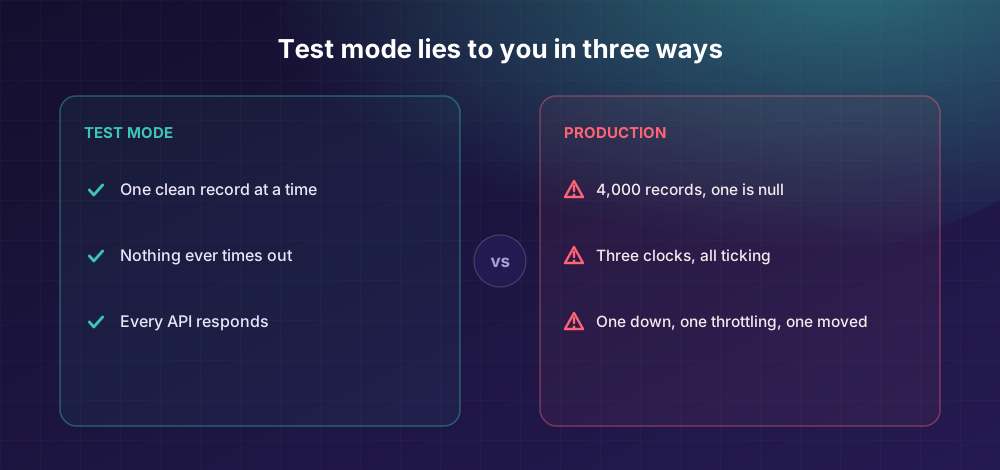
Every failure below is a variation on that theme. n8n is not fragile, it is permissive. It will happily let you build something that works perfectly until the moment it matters. The guards are about removing that permission.
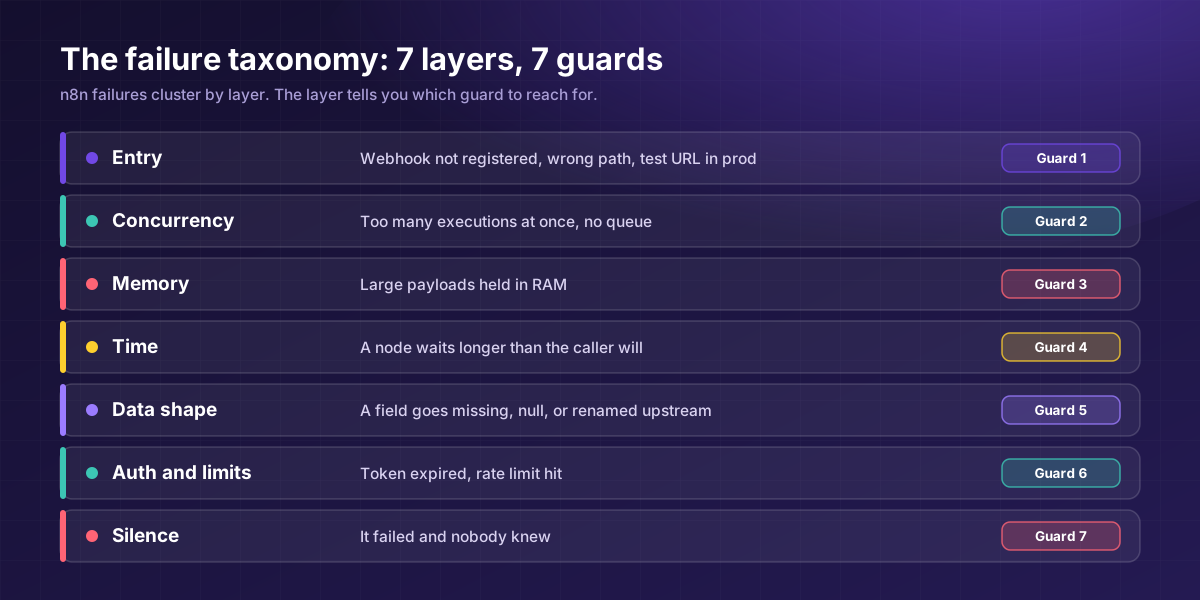
The failure taxonomy: what breaks, by layer
Most troubleshooting content gives you a flat list of errors. That is not how failures actually cluster. They cluster by layer, and the layer tells you what to fix.
| Layer | What breaks | What it looks like | The guard |
|---|---|---|---|
| Entry | Webhook not registered, duplicate path, test URL in production | 404s. Silence. Nothing in the execution log at all. | Guard 1 |
| Concurrency | Too many executions at once, no queue | Sluggish, then unresponsive, then dead | Guard 2 |
| Memory | Large payloads held in RAM | JavaScript heap out of memory | Guard 3 |
| Time | A node waits longer than the caller will | 504s, ETIMEDOUT, or Cloud's ~100-second 524 | Guard 4 |
| Data shape | A field missing, null, or renamed upstream | Node throws on item 1,847 of 4,000 | Guard 5 |
| Auth and limits | Token expired, rate limit hit | 401s and 429s, usually at the worst time | Guard 6 |
| Silence | It failed and nobody knew | The worst one. Discovered by a customer. | Guard 7 |
Print that table. It turns "the workflow is broken" into "the workflow is broken at the concurrency layer," which is a fixable sentence. Hardening each of these layers is what separates a demo from a system, and it is the work we build into every n8n automation engagement.
Guard 1: Answer the door before you cook the meal
The failure we see most often is not dramatic. A webhook holds the HTTP connection open until the whole workflow finishes. Your workflow calls an API that takes eight seconds. Every caller waits eight seconds. Then the caller times out, and depending on the sender, that event may be gone permanently, because external platforms do not retry forever.
The fix: set the Webhook node to respond immediately. Return the 200 before any external API call, database query or LLM step. Acknowledge receipt, then do the work.
This is a two-click change that prevents an entire category of silent data loss, and it is the single most skipped setting in n8n.
Also, three registration gotchas that stop callers reaching your workflow:
- Test URL and production URL are different paths. The test path and the production path are not the same endpoint. If your external service was configured during testing, it is still pointing at the test path.
- One webhook per path and method. If another workflow already registered that path and method, n8n refuses to register your webhook and shows a message that the path and method are already in use.
- N8N_WEBHOOK_URL unset (formerly WEBHOOK_URL) means n8n advertises localhost, which no external service can reach.
Guard 2: Queue mode, or accept a ceiling
By default, n8n does not limit how many production executions run at once, and it does not throttle inbound webhooks. That sounds like a feature. It is a cliff. The billing side of the same problem catches people just as hard, and we cover it as the execution-count trap.
If each of those runs does real work, a burst of 200 requests in 10 seconds against a single-process instance produces a queue that never drains, memory climbing, and then an instance that stops responding to anything at all. Self-hosted instances often need manual intervention to recover.
The fix is three components, not one setting:
- A webhook layer that responds instantly (Guard 1)
- A queue (Redis) that holds pending jobs
- One or more workers that process them
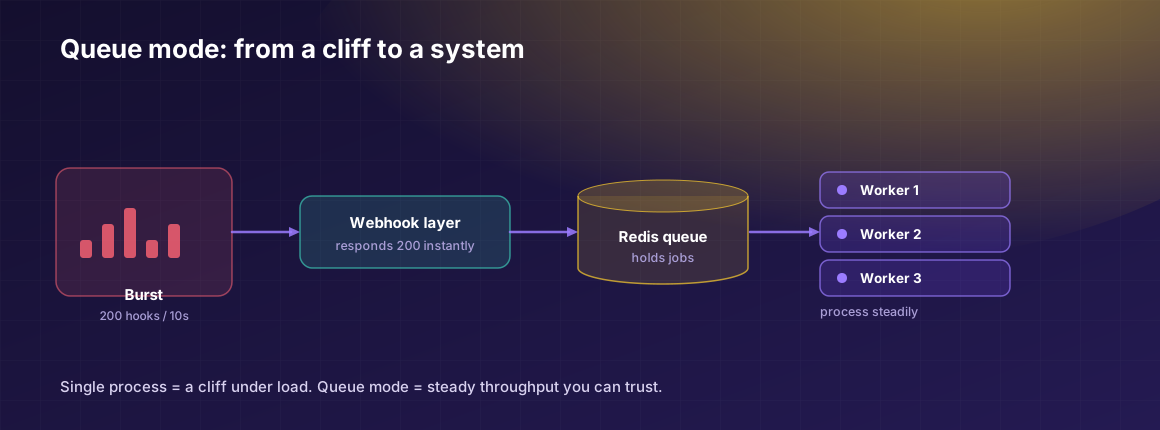
Queue mode, Redis, and separate worker containers: this is the architectural line between "n8n on a box" and "n8n in production."
Two warnings people learn the hard way. Queue mode has had real bugs, including a documented issue where every workflow failed to execute under queue mode, making it unusable for production until it was resolved. Pin your version and test the mode before you rely on it. And queue mode plus large binary payloads is a known rough edge: large webhook returns have been reported failing in queue mode while succeeding in test.
Queue mode also needs consistent CPU and memory. Running workers on a cheap shared box reproduces the exact failure you adopted queue mode to escape.
Guard 3: Never hold the whole dataset
JavaScript heap out of memory is n8n's most-searched error and it has one cause: you asked Node to hold more than it has. Code nodes with large arrays, an HTTP node pulling 50,000 records, a binary file loaded whole.
The fix, in order of leverage:
- Loop Over Items (Split in Batches). Fetch, then batch into small groups, process, and merge. This is usually the fix.
- Paginate at the source. Do not fetch everything and then batch it. Fetch page by page.
- Stream binaries. Never load an entire file into memory when you can chunk it.
- Raise the ceiling last. A bigger memory limit buys headroom; it does not fix an unbounded workflow. If your only fix is more RAM, you have deferred the failure, not removed it.
Guard 4: Know which timeout kills you
There are three separate clocks, and people debug the wrong one constantly:
| Clock | Typical | What it does |
|---|---|---|
| Caller's timeout | 30-60s | The external service gives up. Guard 1 solves this. |
| Reverse proxy | 60-120s | Nginx or Cloudflare cuts the connection |
| n8n execution | EXECUTIONS_TIMEOUT | The workflow itself is killed |
On n8n Cloud there is a fourth: if webhook workflows fail at almost exactly 100 seconds with a 524, that is Cloudflare, not your logic. No amount of node tuning fixes it, respond immediately instead.
EXECUTIONS_TIMEOUT is your default; EXECUTIONS_TIMEOUT_MAX is the hard ceiling a workflow cannot exceed regardless of its own setting. Set both deliberately.
Guard 5: Assume the data will betray you
The workflow that ran perfectly for six weeks and then threw on item 1,847 did not change. The data did. Someone left a field blank. An upstream API renamed a key. A record came through as an array where you assumed an object.
The fix is a validation gate as node two. Before any processing, add an IF or Code node that checks required fields exist and are the right type. Route failures to a dead-letter path (a Sheet, a Slack channel, a table) rather than throwing.
This is the difference between "one bad record killed the run" and "one bad record is in a list for someone to look at, and the other 3,999 processed."
And the guard nobody talks about: idempotency. If a workflow half-completes and you retry it, does it do the first half again? Send the email twice? Create the duplicate deal? Many n8n builds have no answer, and the first time it matters is the first time it is embarrassing.
Give each run a deterministic key: the record ID, not a random run ID. Check "have I already processed this?" before the side effect. Retries without idempotency are just a faster way to make the mess bigger.
Guard 6: Auth and rate limits are scheduled failures
Expired tokens and changed API authorisations break n8n workflows in predictable ways, which makes them a planning problem rather than an incident.
- Refresh tokens before they expire, not when the workflow fails at 3am.
- Respect 429s with exponential backoff, not a fixed retry that hammers the same limit.
- Batch settings first. Adjusting batch size and interval is the fastest win against rate limits, and the effect is immediate.
- Build a rate monitor. A tiny workflow (a webhook, a counter, an IF over a threshold, a Slack alert) that warns you before you hit the wall.
- Set a calendar reminder for API deprecations. A monthly health review catches breaking changes before they bite you.
Guard 7: Make silence impossible
Every other guard is about preventing failure. This one accepts that failure will happen anyway. It is n8n error handling as a discipline, not an afterthought.
The rule: if a workflow fails and nobody is told within five minutes, you do not have a system. You have a rumour.
Minimum viable:
- An error workflow attached to every production workflow. Not most. Every one.
- Alerts to a channel a human actually watches. Not an inbox. A channel.
- Retries with backoff on anything touching a network.
- Structured logging with enough context to debug without reproducing. Turn on debug logging only when you need server-side detail, and treat those logs as sensitive: they contain your data.
- Versioned backups of workflow JSON. In git, ideally.
- A heartbeat on scheduled workflows. A cron job that did not fire produces no error. Silence is indistinguishable from success. The only defence is a workflow that alerts when an expected run does not happen.
That last one catches the failure mode that costs the most and gets written about the least.
Emergency triage: 60-second diagnostic
| Symptom | Most likely | First check |
|---|---|---|
| Webhook 404s | Not registered, or wrong path | Is the workflow published? Duplicate path registered? Test versus production URL? |
| Fails at ~100s on Cloud, 524 | Cloudflare, not you | Set Respond Immediately (Guard 1) |
| Heap out of memory | Unbounded dataset | Add Loop Over Items (Guard 3) |
| Fine, then dies under load | No queue mode | Check concurrency (Guard 2) |
| Stuck in "queued" | Worker health, or a queue-mode bug | Check workers are alive, check your n8n version |
| 401s appearing | Token expired | Refresh, then automate the refresh (Guard 6) |
| 429s | Rate limit | Batch size and backoff (Guard 6) |
| Threw on record 1,847 | Data shape | Validation gate (Guard 5) |
| Nobody noticed for a week | No error workflow | Guard 7. Do this one today. |
What this costs to skip
The guards take roughly a day to add to an existing workflow. Most teams skip them because the workflow "works."
It does work. It works right up until the first Monday it does not, and then someone spends a morning discovering that leads have been silently dropping for nine days. That is not a technology failure, it is the entirely predictable consequence of shipping a demo and calling it a system.
A production workflow is not a workflow that runs. It is a workflow that tells you when it does not.
Send us the workflow that keeps breaking, or the one manual process you most want gone. In a free Workflow Teardown you get a diagram of how we would build it with the guards in place, build notes and a fixed quote.
Frequently asked questions
Test mode gives you one clean record, no concurrency, and every API responding. Production gives you bursts, malformed data, rate limits and outages. The logic is usually fine, the environment is not.
Holding too much data in memory at once: large arrays in Code nodes, unpaginated API pulls, or whole binary files. Fix it with Loop Over Items (Split in Batches) and source-side pagination. Raising the max-old-space-size buys headroom but does not fix an unbounded workflow.
If you handle concurrent webhooks or any real volume, yes. By default, self-hosted n8n in regular mode does not limit concurrent production executions, so a burst can exhaust the instance. Queue mode means Redis plus separate worker processes, not a single toggle.
Common causes: the workflow is not published; the external service is using the test URL rather than the production URL; another workflow already registered that path and method, which n8n refuses with a conflict message; or N8N_WEBHOOK_URL is not set, so n8n advertises localhost.
Work out which of the three clocks is firing: the caller's, the reverse proxy's, or n8n's execution timeout. Most webhook timeouts are solved by responding immediately and processing asynchronously rather than by extending any timeout.
It means a workflow can be safely re-run without repeating side effects. Without it, a retry after a half-completed run can send duplicate emails or create duplicate records. Use a deterministic key from the source record and check before acting.